Categories
Latest Posts



Tags
Advertising Amazon Amazon Advertising Amazon Experts Amazon Listing Optimization Amazon Marketplace Amazon News Amazon Prime Amazon Professional Sellers Summit Amazon Seller amazon sellers Amazon Seller Tips Amazon Seller Tools ASIN Brand Management Brands Buy Box Campaign Manager Consumer Trends COVID-19 downloadable Dynamic Pricing Ecommerce FBA FBM Holiday Season industry news Multi-Channel Fulfillment Optimize pay-per-click Pricing Algorithm Pricing Software Private Label Profits Repricing Repricing Software Revenue Sales Seller Seller-Fulfilled Prime Seller Performance Metrics SEO SKU Sponsored Products Ads Strategy
Get the latest insights right in your inbox
Resource | Blog
How to Optimize Your Amazon Inventory Performance Index Score

Dawn Jenks
Dawn Jenks is a copywriter for Feedvisor, where she develops SEO e-commerce product descriptions and is a contributing blog writer. She was previously a travel public relations executive, and enjoys running, hiking, cooking, and reading.
Managing your Amazon inventory effectively is a critical component for success, and if it’s not done right, it can make or break your business. By learning and implementing some inventory management best practices, sellers can reduce their storage and inventory costs and improve their products’’ profitability.
Amazon has a metric that helps sellers gauge the health of their inventory, referred to as the Inventory Performance Index (IPI). Let’s review what your IPI score means, the factors that affect it, and the actions you can take for improvement.
What is the Inventory Performance Index?
According to Amazon, your IPI score measures how efficient and productive you are in managing your FBA inventory. The most important factors that play into your IPI score are how well you can:
- Maintain a balanced inventory level between sold and on-hand inventory and avoid excess and aged inventory,
- Avoid long-term storage fees.
- Fix listing problems.
- Keep your best-selling products in stock at the proper levels to meet customer demand and maximize customer satisfaction.
Inventory health is determined by the number of units present in your inventory, and if there’s not enough to meet demand, you’ll run out of stock and lose valuable sales. But if you have too much inventory, it leads to higher holding and storage costs.
IPI scores range from 1 to 1000, and the higher, the better⎯for both sellers and Amazon. Proper inventory management motivates sellers to stock the right products in the right quantities, which allows Amazon to optimize its warehouse space.
How to Check Your Amazon IPI Score?
You can view your current IPI score in your Inventory Dashboard, which can be accessed in your Seller Central by clicking “Inventory” and in the drop-down menu, selecting “Inventory Planning.”
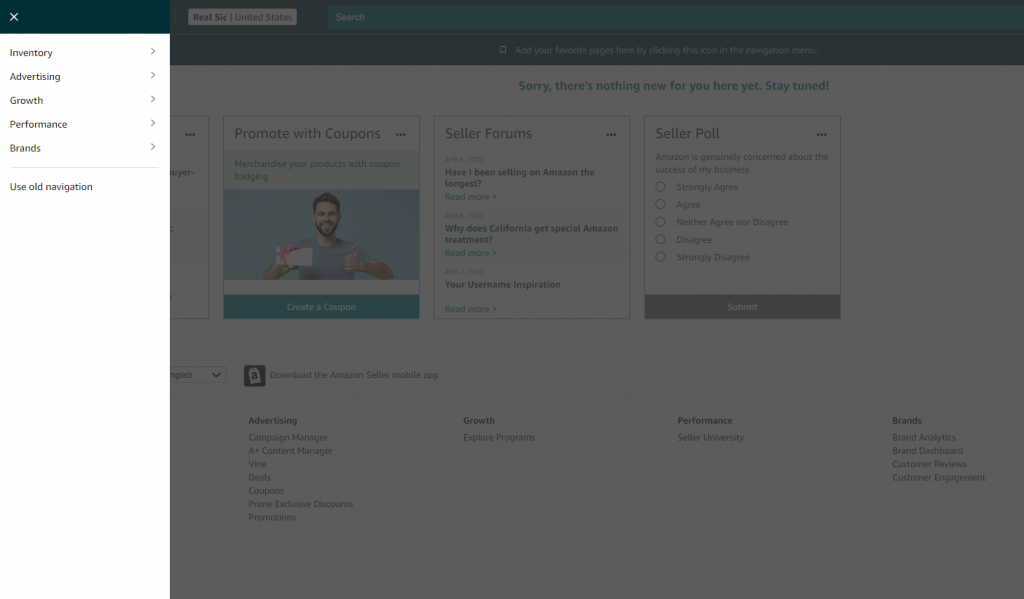
Then click the “Performance” tab to view your IPI score.
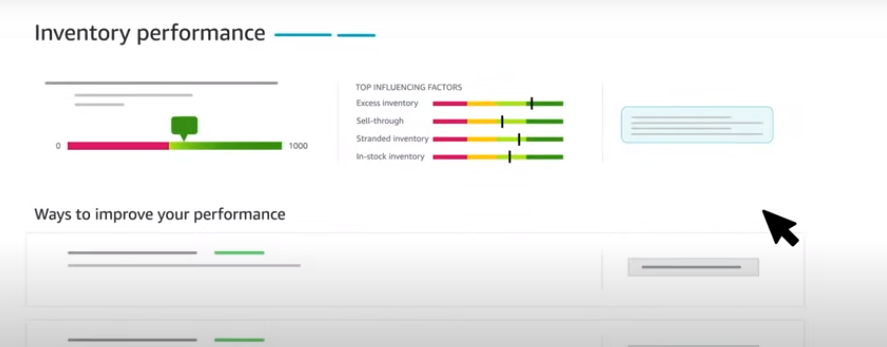
On your Inventory Performance Dashboard, Amazon facilitates how sellers can increase their IPI score by providing the following:
- Excess Inventory recommendations for optimizing holding, storage, and carrying costs.
- Restock suggestions for improving in-stock rate.
- Actionable insights on stranded inventory items to ensure the availability of product listings.
Amazon updates your IPI score weekly, based on your last 3-months of performance stats.

How is Amazon’s IPI Calculated?
Amazon has not disclosed its formula for calculating IPI scores but has stated that “IPI points are not deducted for running out of stock.” Therefore, out-of-stock items will not hurt your score.
However, stranded inventory is a different story, as this can impact your IPI score. Keeping that in mind, the key factors that can increase your IPI score are:
- Reducing excess inventory sitting at Amazon warehouses
- Improving your sell-through rate.
Stranded inventory can impact your IPI score
Amazon IPI Score Threshold 2022
Amazon has a minimum IPI score threshold that all sellers must meet to avoid paying high storage costs. If your score drops below that threshold, Amazon will apply storage limits on your seller account until you have improved your inventory levels.
In 2022, sellers with an IPI score below 450 are subject to storage limits. An IPI score of 450 or above is considered “good,” and FBA sellers with a score that falls in this range can breathe easy with fewer storage costs and access to more Amazon warehouse storage space.
If you score above the 450 threshold for two consecutive weeks, you’ll have access to unlimited storage space for each storage type (footwear, apparel, aerosol, oversize, standard-size, flammable).
An IPI score of 450 or above is considered “good”
What are the Factors That Affect Your IPI Score?
Although Amazon has not disclosed the formula for calculating IPI scores, we do know the factors that influence your score and what you can do about it.
1. Excess Inventory
This is one of the biggest influencers of your IPI score, as Amazon’s priority is to move inventory from its warehouses to customers’ doorsteps as quickly as possible. Amazon declares an item to be “excess” or “overstock” when the amount of FBA inventory exceeds a 90-day supply, depending on forecasted demand.
A good rule of thumb is to maintain approximately 30-60 days’ worth of inventory to avoid overstocking. Additionally, Amazon provides sellers with actionable insights into product demand and restocks on their Inventory Dashboard.
For example, if your inventory is above what it should be, Amazon gives you the number of excess units and what you must do with that excess inventory. Amazon also provides three other metrics for a deeper understanding of your excess inventory:
- Excess Units: The number of units that will cost you more to do nothing and pay storage fees rather than reducing the price or removing the inventory. This is determined by customer demand and product costs.
- Estimated Total Storage Cost: This is the total storage cost you’ll incur over 3 years if you take no action and let your inventory stay idle in the fulfillment center.
- Reduce Excess Inventory: Clicking this button displays how many SKUs have excess inventory and brings you to the “Manage excess inventory” page where you can take action to reduce it.
2. FBA Sell-Through Rate
Your sell-through rate is based on the number of units sold and shipped in the past 90 days divided by the average number of units on-hand at an FBA warehouse during that same time.
To access your sell-through rate on your Inventory Dashboard, click on “Improve sell-through,” which takes you to the FBA Inventory Page. Here, you’ll see which products have a low sell-through rate, sales rank, sales over 90 days, available inventory, inventory storage duration, and approximate long-term storage costs. You’ll also see recommendations on how to improve your low sell-through rate and reduce long-term storage costs.
3. Stranded Inventory
This refers to the number of units stored with no active offer due to a problem with its listing. As customers cannot buy the item, the seller incurs higher storage fees and missed sales opportunities. Amazon provides a detailed overview of your stranded inventory with recommendations on how to resolve it.
If you have stranded inventory, you’ll see a Warning button that says “Fix listings” in your inventory performance dashboard. Clicking this will navigate you to the “Fix stranded inventory” page, where you can review the number of units stranded. If they have an auto-removal date, it will show the cause of the stranded inventory and an option to relist them.
4. In-Stock Inventory
Amazon monitors your performance on how well you stock your popular ASINs. While this metric does not negatively impact your IPI score, it can help you improve it.
Amazon estimates the number of FBA sales you missed due to being out-of-stock, based on a 30-day period of forecasted sales for that product. This should reinforce the importance of keeping your items well-stocked.
If the item was a limited edition or seasonal product that is no longer in production, you could mark it as “non-replenishable” in Restock inventory to protect your IPI score.
Amazon estimates the number of FBA sales you missed due to being out-of-stock, based on a 30-day period of forecasted sales for that product
How Can Amazon Sellers Improve Their IPI Score?
Here are some recommendations on how you can improve your IPI Score:
Improve Your Sell-Through Rate
You’ll want to maintain a 90-day sell-through rate that puts you in the “green” on Amazon’s IPI graph, indicating that your rate falls in the “good” to “excellent” range. You can improve your sell-through rate by running sponsored ads, running a promotion, optimizing your listing, and improving your keyword targeting.
Reduce Excess Inventory
Remove items that aren’t selling. Go to the “Manage Inventory Page” to see recommendations on how you can take action against excess inventory.
Avoid Long-Term Storage Fees
Remove inventory within 365 days of its sitting in the warehouse. You’ll pay for it in long-term storage fees if you don’t. Just create a removal order or allow Amazon to get rid of it.
Address Listing Issues
If you have stranded inventory or any other listing issues that are preventing sales, it’s time to take these actions:
- Keep an eye on your stranded inventory percentage
- Make sure your inventory levels are optimized
- Avoid excess inventory over a 90-days’ supply period
- Place priority on your most popular products, and keep a 30-60 days supply on hand
- Monitor your inventory dashboard regularly
Maintain a 90-day sell-through rate that puts you in the “green” on Amazon’s IPI graph
How Feedvisor’s Platforms Help Manage Inventory
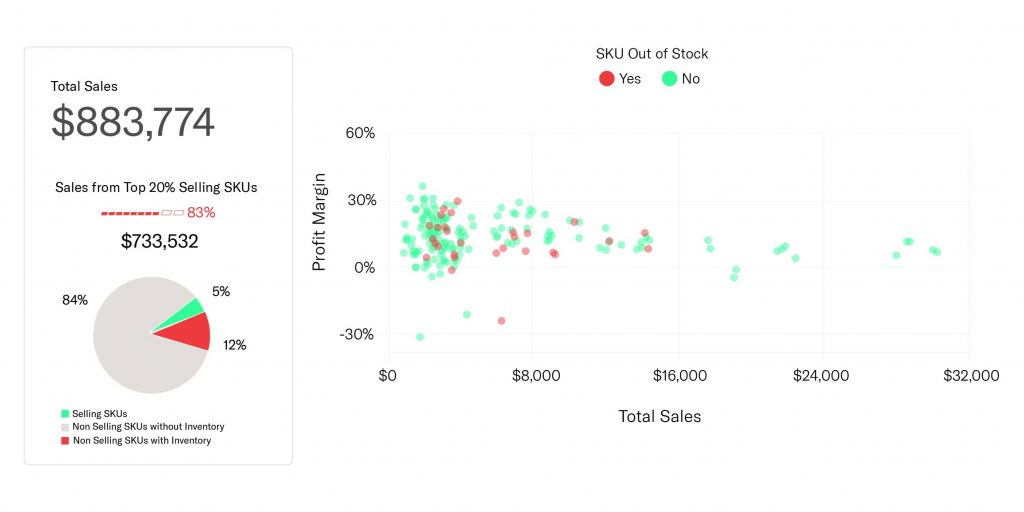
Feedvisor’s inventory management insights ensure that your Amazon inventory is always at its optimal level. With real-time alerts, you’re notified when your items are going out of stock and it’s time to re-order, as well as accurately predict future inventory needs with demand forecasting.
Final Thoughts
Maintaining healthy inventory levels leads to better profitability for your Amazon business. So pay attention to your IPI score to ensure that you’re not losing money on sales and having to pay high storage costs.