

Categories
Latest Posts



Tags
Advertising Amazon Amazon Advertising Amazon Experts Amazon Listing Optimization Amazon Marketplace Amazon News Amazon Prime Amazon Professional Sellers Summit Amazon Seller amazon sellers Amazon Seller Tips Amazon Seller Tools ASIN Brand Management Brands Buy Box Campaign Manager Consumer Trends COVID-19 downloadable Dynamic Pricing Ecommerce FBA FBM Holiday Season industry news Multi-Channel Fulfillment Optimize pay-per-click Pricing Algorithm Pricing Software Private Label Profits Repricing Repricing Software Revenue Sales Seller Seller-Fulfilled Prime Seller Performance Metrics SEO SKU Sponsored Products Ads Strategy
Get the latest insights right in your inbox
Amazon Product Listing Optimization: What Actually Moves the Needle in 2026
Published: February 27, 2017
Last updated: March 03, 2026

Marissa Incitti
Marissa Incitti leads research and content at Feedvisor focused on Amazon, Walmart, and the broader e-commerce marketplace ecosystem. Her work covers retail media performance, pricing strategy, and how AI-driven discovery is reshaping how brands compete across marketplaces. Prior to Feedvisor, she worked in content leadership roles at a Fortune Global 500 omnichannel commerce technology company.
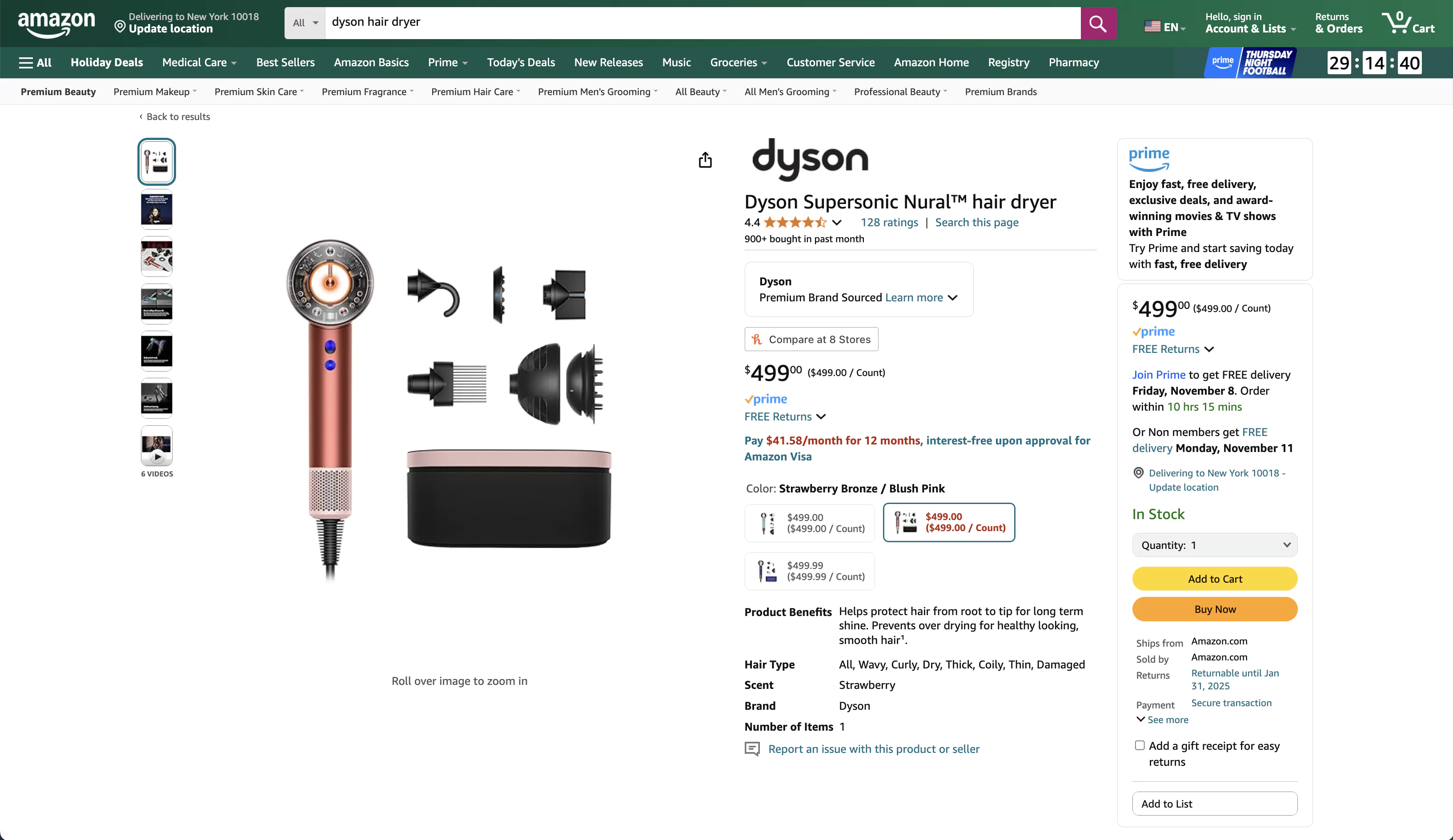
Table of Contents
- Most Sellers Optimize the Wrong Things First
- Product Titles: The 200 Characters That Matter Most
- Bullet Points and Descriptions: Write for Buyers, Not Bots
- Product Images and Video: The Conversion Driver You’re Underinvesting In
- Backend Search Terms: 250 Bytes, No More
- A+ Content: The Revenue You’re Leaving on the Table
- How Amazon’s Algorithm Evaluates Your Listing
- Amazon’s Listing Quality Score: The Number to Watch
- Common Listing Optimization Mistakes
- Where to Start
- FAQ
Most listing optimization guides read like a checklist: fill in the title, add some keywords, upload a photo, done. In 2026, with Amazon’s search running on semantic AI and over 70% of shoppers browsing on mobile, that advice is actively misleading.
The difference between a listing that converts and one sitting at the bottom of page two comes down to a handful of specific decisions - and most sellers get the priority order wrong.
Most Sellers Optimize the Wrong Things First
Sellers spend hours on backend keywords while their main product image looks like it was shot in a garage. They obsess over keyword density in bullet points but never check what their title looks like on a phone screen - where only the first 70 to 80 characters show.
The elements that actually drive ranking and conversion, in rough order of impact:
- Product title - Amazon’s algorithm weights title keywords most heavily
- Main image - The single biggest factor in click-through rate from search results
- Price and Buy Box status - No listing optimization overcomes being out of the Featured Offer
- Bullet points - Where you convert browsers into buyers
- A+ Content - Can increase sales by up to 20% for Brand Registered sellers
- Backend search terms - The catch-all for keyword variations you could not fit elsewhere
- Reviews and ratings - You cannot optimize these directly, but everything above feeds into them
That ordering matters. If your images are weak, perfecting your backend keywords is rearranging deck chairs.
Product Titles: The 200 Characters That Matter Most
Amazon updated product title requirements in January 2025, and enforcement is real. The rules now:
- 200 characters maximum (80 recommended for mobile visibility)
- Title case required - all caps are banned
- No promotional language - “Best Seller,” “Top-Rated,” “#1 Choice,” and “High-Quality” will get your listing flagged
- No word repetition - the same word cannot appear more than twice (prepositions and articles excluded)
- Banned characters: !, $, ?, _, {, }, ^, unless part of your brand name
The formula that still works: Brand + Model + Product Type + Key Differentiator + Size/Color. (For detailed title construction, see the Product Search guide.)
Put your most important keywords first. Amazon’s algorithm gives higher relevance to words appearing earlier in the title, and on mobile, everything after character 80 is cut off. If your brand name is not well-known, lead with the product type instead. A shopper searching “stainless steel water bottle” does not care about your brand name - they care that your product matches their search.
Amazon now suggests title changes via the Review Listing Updates tab, with a 14-day grace period before auto-enforcement. Ignore these at your own risk.
Bullet Points and Descriptions: Write for Buyers, Not Bots
Amazon gives you 5 to 10 bullet points depending on category. Most sellers waste them repeating what is already obvious from the images or stuffing keywords that read like a search query, not a selling proposition.
Lead each bullet with a benefit, follow with the feature. Not “Made with 304 stainless steel” but “Keeps drinks cold for 24 hours - double-wall 304 stainless steel insulation with vacuum seal.”
Your product description (below the fold) still matters for semantic search. Amazon’s COSMO AI model interprets intent rather than matching exact keywords, so natural language that answers real buyer questions outperforms keyword-packed blocks. Write as if answering “Why should I buy this instead of the other options?”
Amazon’s AI listing tools can now auto-generate titles, bullets, and descriptions when you create a listing. Use the draft to spot gaps, then make three edits: front-load your top query in the first 80 characters, insert a proof-backed differentiator the model missed, and delete any adjective you could not defend in a customer review.
Product Images and Video: The Conversion Driver You’re Underinvesting In
You get up to 9 image slots. Use at least 6 high-definition images. The minimum spec that matters: 1,000 x 1,000 pixels for zoom capability (Amazon recommends 2,000 x 2,000 for the best zoom experience).
Your main image has hard requirements: pure white background (RGB 255,255,255), product fills at least 85% of the frame, JPEG or PNG format. Expect a measurable swing in click-through rate from the main image alone - it is worth testing crop, angle, and shadow variations through Manage Your Experiments before you touch ad bids.
For supporting images: product-in-use shots for context, scale references with dimensions overlaid, feature callout annotations, and packaging shots when relevant. If you are Brand Registered, publish a 45- to 90-second demo video. Amazon’s internal data shows video increases time on page, and that engagement signal feeds back into ranking.
Amazon’s search now uses computer vision to tag your images through AI recognition. Your image quality affects discoverability, not just conversion. A blurry lifestyle shot does not just look bad - it can hurt your ranking.
Backend Search Terms: 250 Bytes, No More
The backend field is your catch-all for keyword variations that did not fit naturally in your title or bullets. The limit is 250 bytes (not characters - multi-byte characters like accented letters count as more).
Rules that save you from wasting those bytes:
- No repetition - if a word appears in your title, do not repeat it in backend terms
- Use hyphens for compound words - “noise-canceling” covers “noise,” “canceling,” and “noise-canceling” in a single entry
- Skip punctuation and stop words - “a,” “the,” “for” waste bytes
- Include common misspellings and synonyms - this is exactly where they belong, not in your customer-facing copy
Do not use competitor brand names. Amazon prohibits it, and violations can lead to listing suppression.
A+ Content: The Revenue You’re Leaving on the Table
If you are Brand Registered and not using A+ Content, run the numbers on what that costs you. Amazon’s own data says Basic A+ Content can increase sales by up to 8%. Premium A+ pushes that to 20%.
For a concrete example: if your top ASIN does $50,000 per month and you add Premium A+ Content, a 20% lift means $10,000 per month in additional revenue - $120,000 per year from a content upgrade that is currently free. Even Basic A+ at 8% adds $4,000 per month. Start with your highest-revenue ASINs.
Basic A+ Content replaces your standard product description with rich media: images, comparison charts, formatted text blocks. You can A/B test layouts through Amazon’s Manage Your Experiments tool.
Premium A+ Content (A++) unlocks 16 additional modules including video (up to 3 minutes), FAQ sections, image carousels, and hover-over hotspots. It is currently free during a promotional period. Eligibility requires Brand Registry, a Brand Story on all ASINs, and at least 5 approved A+ projects in the past 12 months.
The qualification threshold matters. If you have fewer than 5 A+ projects, start building Basic across your catalog now. The jump from Basic to Premium is worth prioritizing - but only after you have nailed your titles and images, which affect every shopper, not just those who scroll below the fold.
How Amazon’s Algorithm Evaluates Your Listing
Forget keyword matching. Amazon’s search now interprets what the buyer actually wants - and that changes which optimization levers matter.
The foundation (A9/A10): Amazon’s core algorithm still weighs keyword relevance, sales velocity, conversion rate, and stock availability. FBA and Prime eligibility provide a ranking advantage. Your seller rating and account health metrics feed into seller authority, which influences ranking.
The shift (COSMO + Rufus): Amazon’s COSMO AI model uses large language models to understand buyer intent, not literal keyword matches. Keyword stuffing is not just ineffective in this environment - it actively hurts readability without any ranking benefit in return. Listings with natural, benefit-oriented content that answers real purchase questions now outperform keyword-dense alternatives.
Rufus, Amazon’s conversational AI assistant, analyzes your entire listing - title, bullets, description, reviews, Q&A - and recommends products in response to natural language queries. A query like “quiet dishwasher for small kitchen” now rewards the listing that says “38 dB, 18-inch slim, 120V, 45-minute quick wash” over the one that repeats “dishwasher” twelve times. The algorithm has caught up to the buyer.
Once you are already winning the Buy Box, listing optimization is where the next sales increment comes from.
Your listing content feeds directly into advertising performance. Optimized titles, images, and A+ Content drive higher click-through on Sponsored Products campaigns and lower ACoS. Feedvisor’s AI-driven platform connects pricing strategy with advertising optimization - so every listing improvement compounds into measurable ROI.
Amazon’s Listing Quality Score: The Number to Watch
Amazon assigns a listing quality score to every product. Sellers with scores above 80 generated 92% more sales than those below that threshold, according to Amazon’s own data. Nearly double - from a completeness score most sellers never check.
The score factors in product information completeness, image quality, A+ Content presence, keyword coverage, and product detail page completeness. Check yours in Seller Central and treat anything below 80 as a priority fix.
Common Listing Optimization Mistakes
Over 70% of Amazon traffic is mobile. If you have not checked what your listing looks like on a phone, you are optimizing blind. Titles get truncated, images shrink, and bullet points may render as a wall of text.
Optimizing once and forgetting. Seasonal terms, competitor shifts, and algorithm updates mean your listing performance degrades if you do not revisit it. Quarterly reviews are the minimum.
Your top 20% of ASINs probably drive 80% of your revenue. That means your best seller needs A+ Content and 9 polished images before your lowest-traffic ASIN gets a second look. And if your product comes in multiple sizes or colors, parent-child ASIN relationships consolidate reviews and listing authority - listing each variation separately fragments your social proof.
Where to Start
Audit your top 20% of ASINs this week against three numbers: listing quality score above 80, title keywords visible in the first 80 mobile characters, and at least 6 high-definition images. If any of those three fail, fix them before touching anything else.
Then check A+ Content eligibility. If you are already Brand Registered, get Basic A+ on your top ASINs immediately - the 8% sales lift alone justifies the time investment. Need help identifying which of your hundreds of ASINs to optimize first? Feedvisor’s listing intelligence surfaces the products where optimization delivers the highest ROI.
FAQ
How often should I update my Amazon product listings?
Quarterly for your top 20 ASINs. Before each seasonal peak, 6 to 8 weeks out. Immediately after any Amazon policy email. And any time your listing quality score dips below 80.
Does A+ Content help with Amazon SEO and search ranking?
A+ text is not directly indexed for keyword search - Amazon has confirmed this. But it boosts conversion rate, and conversion is one of the strongest ranking signals in Amazon’s algorithm. The effect is indirect but measurable: sellers adding A+ to ASINs with 50-plus daily sessions typically see organic ranking improvements within 4 to 6 weeks as the conversion lift compounds. So yes, it helps SEO - just not the way most people think.
What is the difference between Basic and Premium A+ Content?
Basic gives you rich text, images, and comparison charts; Premium adds video, carousels, FAQ modules, and hover-over hotspots, requires 5 approved A+ projects in the past 12 months, and is currently free.
What are the most important Amazon product listing elements for conversion?
Main image and title drive click-through from search results. Bullet points and product images drive conversion on the detail page. Price and Buy Box status gate everything else - no amount of listing optimization helps if you are not winning the Featured Offer.
Your Listings Are Underperforming -- Let the Data Show You Where