

Categories
Latest Posts

Tags
Advertising Amazon Amazon Advertising Amazon Experts Amazon Listing Optimization Amazon Marketplace Amazon News Amazon Prime Amazon Professional Sellers Summit Amazon Seller amazon sellers Amazon Seller Tips Amazon Seller Tools ASIN Brand Management Brands Buy Box Campaign Manager Conference COVID-19 downloadable Dynamic Pricing Ecommerce FBA FBM Holiday Season industry news Multi-Channel Fulfillment Optimize pay-per-click Pricing Algorithm Pricing Software Private Label Profits Repricing Repricing Software Revenue Sales Seller Seller-Fulfilled Prime Seller Performance Metrics SEO SKU Sponsored Products Ads Strategy
Get the latest insights right in your inbox
Amazon Product Detail Page: What Separates High-Converting Listings from the Rest
Published: February 27, 2017
Last updated: April 19, 2026

Marissa Incitti
Marissa Incitti leads research and content at Feedvisor focused on Amazon, Walmart, and the broader e-commerce marketplace ecosystem. Her work covers retail media performance, pricing strategy, and how AI-driven discovery is reshaping how brands compete across marketplaces. Prior to Feedvisor, she worked in content leadership roles at a Fortune Global 500 omnichannel commerce technology company.
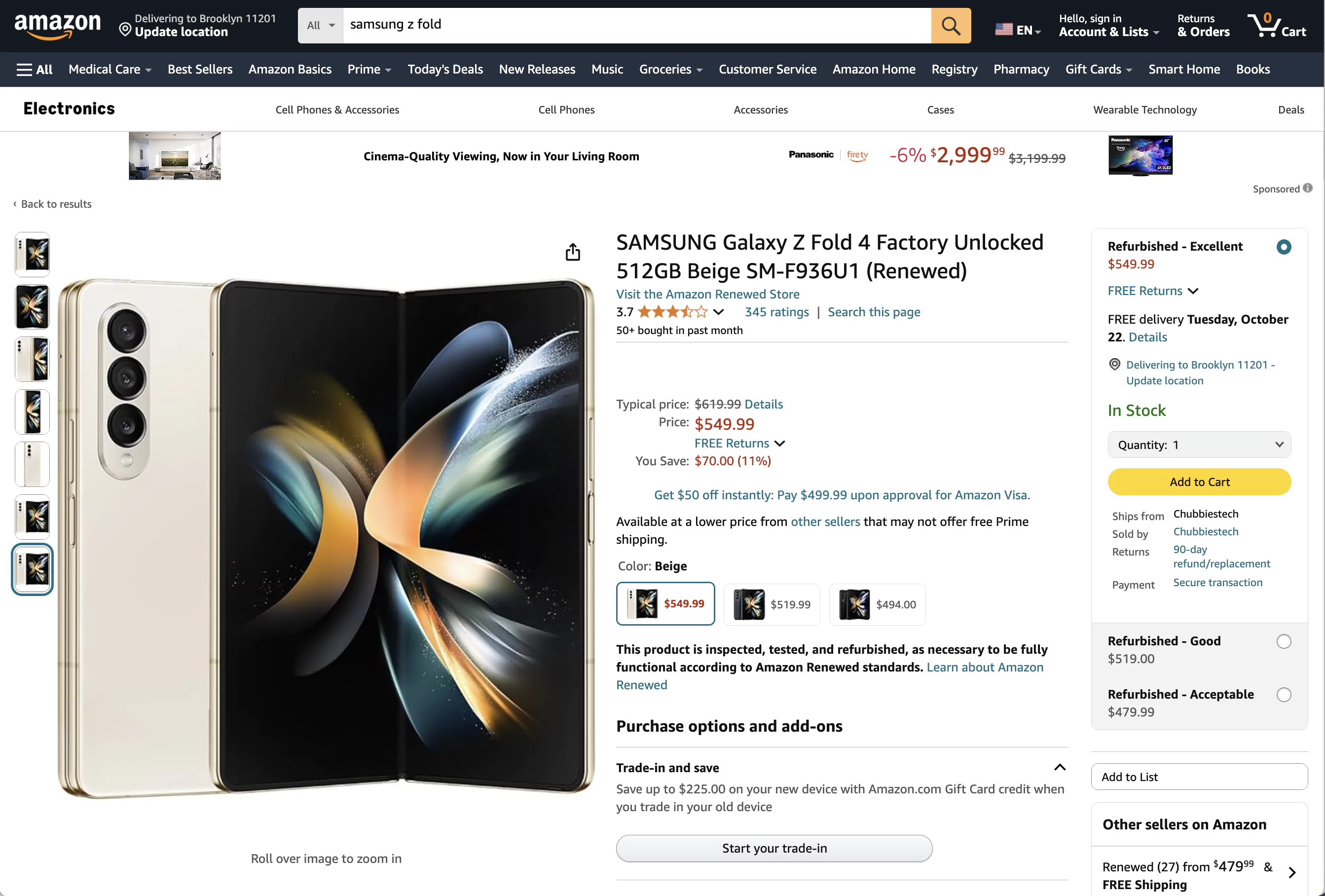
The Amazon Product Detail Page (PDP) - also called the product page or product details page - is the listing shoppers land on when they click your product from search results. It contains the title, bullets, images, A+ Content, price, reviews, and product variations. It’s the single highest-leverage listing page on Amazon.
Most sellers treat their Product Detail Page like a form to fill out - title, bullets, images, done. That’s a mistake. The PDP is a sales page, and every element on it either builds toward the conversion or kills it. The title alone determines whether mobile shoppers (over 70% of Amazon traffic) even bother scrolling past the fold.
This guide breaks down what actually moves the needle on your PDP - from the elements that matter most to the 2025 title rules that are already getting listings suppressed.
Table of Contents
- What Actually Matters on a Product Detail Page
- How to Create a Product Detail Page in 2025
- 2025 Title Requirements: What Changed and Why It Matters
- A+ Content: When It’s Worth the Effort
- The Mobile Reality
- FAQs
What Actually Matters on a Product Detail Page
Not every PDP element carries equal weight. Here’s what drives purchasing decisions, in rough order of impact:
Above the fold - this is where 80% of Buy Box conversions happen. Your product title is the first thing shoppers read, and on mobile, they see only the first 70-80 characters. Your product images come next - listings with 6+ high-quality images consistently outperform those with fewer. Then the Buy Box itself: price, shipping speed, and seller reputation compressed into one decision point.
Below the fold, the elements that matter depend on your category. Bullet points need to lead with benefits, not features - “Keeps drinks cold for 24 hours” beats “Double-wall vacuum insulation” every time. The product description (or A+ Content for Brand Registry sellers) provides the detail shoppers need to commit.
| PDP Element | Impact | Key Optimization |
|---|---|---|
| Title (first 80 chars) | Very high | Front-load primary keyword + key attribute |
| Main image | Very high | Pure white background, product fills 85%+ of frame |
| Supporting images (6+) | High | Multiple angles, scale reference, lifestyle shot |
| Bullet points (5) | High | Benefit-first, concise - truncated on mobile |
| Price / Buy Box | Very high | Competitive pricing, fulfillment method affects eligibility |
| A+ Content | Moderate | 8% average sales lift (basic); up to 20% (premium) |
| Reviews & ratings | Very high | Cannot be directly optimized - product quality drives this |
| Backend keywords | Moderate | Fill all fields; invisible but affects search ranking |
Each product has a unique Product Detail Page tied to its ASIN that becomes a permanent part of the Amazon catalog. Product information comes from both Amazon and sellers, and multiple contributors can update it - which is exactly why you need to monitor your listings after creation.
How to Create a Product Detail Page in 2025
You need a Professional Seller account ($39.99/month) to create new listings. Individual plan sellers can only list against existing pages.
The creation flow in Seller Central has changed from older guides. Forget “Manage Your Inventory” - the current path is Catalog > Add Products.
- Sign in to Seller Central with your seller account credentials.
- Go to Catalog > Add Products and search the existing catalog by product name, UPC, EAN, or ISBN.
- If the product exists, match to the existing listing and set your price, quantity, and fulfillment method. If it’s new, click “I’m adding a product not sold on Amazon” and select a category.
- Enter product details: title, brand name, product identifiers (GTIN required unless exempt), bullets, description, images (6+ recommended), and compliance info.
- Set offer details - price, condition, quantity, fulfillment method (FBA or FBM), and shipping details.
- Submit. Amazon reviews and activates the listing, though some categories require approval first.
Amazon now offers AI-generated listing content that drafts titles, bullets, and descriptions for you. Use it as a starting point, but rewrite the title and first bullet yourself. The AI drafts tend to over-stuff attributes and repeat the brand name - costing you mobile visibility where every character counts.
For large catalogs, bulk listing via Catalog > Add Products via Upload lets you use category-specific templates to create hundreds of listings at once.
2025 Title Requirements: What Changed and Why It Matters
Amazon rolled out updated title requirements on January 21, 2025, and they’re enforcing them. If you haven’t audited your titles, some are likely already flagged.
The rules:
- 200 characters maximum (but 80 is the real target - that’s what shows on mobile)
- Title case required; all caps are banned
- No word can appear more than twice (prepositions and articles excluded)
- Promotional language is out: “Best Seller,” “Top-Rated,” “#1 Choice,” “High-Quality” will get flagged
- Banned characters:
!,$,?,_,{,},^,¬,¦(unless part of your registered brand name)
Amazon flags non-compliant titles through the Review Listing Updates tab in Seller Central. You get 14 days to fix them before Amazon auto-enforces its version - and Amazon’s version is rarely what you’d choose. Check proactively.
The practical implication: if your title strategy was “cram every keyword into 200 characters,” that approach is over. Front-load the one keyword that matters most, add your key differentiating attribute, and stop. A tight 80-character title that renders cleanly on mobile will outperform a 200-character keyword dump that gets truncated to gibberish.
A+ Content: When It’s Worth the Effort
A+ Content replaces your basic product description with rich media - images, comparison charts, enhanced layouts. It’s available to Brand Registry sellers, and Amazon claims it lifts sales by up to 8% for basic A+ and up to 20% for Premium A+.
Those numbers sound compelling, but context matters. If you’re doing $5,000/month on a product, an 8% lift is $400/month from content you create once. That’s almost always worth the effort. At $500/month, the same lift is $40 - probably not worth the hours if you have other listings to optimize.
Premium A+ (A++) opens up 16 additional modules (versus 5 for basic), including video up to 3 minutes, image carousels, hover-over hotspots, and FAQ sections - up to 7 modules per ASIN. It’s currently offered free during an extended promotional period. The eligibility bar is real, though: Brand Registry enrollment, Brand Story published across all your ASINs, and at least 5 approved A+ projects in the past 12 months.
Here’s where sellers waste time: they spend hours on A+ Content for products that are already converting well. A+ moves the needle most on products with good traffic but poor conversion - usually items where the basic description doesn’t adequately explain the product or differentiate it from competitors. If your conversion rate is already above category average, your time is better spent on maximizing product visibility through advertising and search optimization.
That said, this logic breaks down for premium categories with complex products. Electronics, appliances, supplements - anything where buyers need education before they commit - can see lifts well above 20% with strong A+ Content.
The Mobile Reality
Over 70% of Amazon traffic comes from mobile. This isn’t a “consider mobile” situation - mobile is the default experience for most of your customers.
What this means in practice:
Only the first 70-80 characters of your title display on mobile. Everything after that is invisible unless the shopper taps to expand - and they rarely do. Your main image carries even more weight on a small screen, so ensure your product fills the frame and key details are visible without zooming.
Bullet points get truncated on mobile too. Lead each bullet with the benefit, not the feature name. “Keeps drinks cold 24 hours” gets read. “Double-wall vacuum insulation technology” gets cut off at “Double-wall vacuum in-” and means nothing.
Premium A+ modules were designed with mobile-first layouts. If you’re eligible, the carousel and video modules render significantly better on phones than basic A+ text-and-image blocks.
One thing most sellers overlook: Amazon’s A9 search algorithm indexes your listing content the same regardless of device, but the conversion behavior differs dramatically. Mobile shoppers make faster decisions and rely more heavily on images and the above-fold content. Desktop shoppers scroll more and read A+ Content. Optimize for mobile first, then ensure your desktop experience holds up.
Your PDP is leaving conversions on the table.
Feedvisor’s AI-powered platform optimizes pricing, advertising, and content strategy together - so your listings don’t just rank, they convert. Learn how Feedvisor can help →
Learn how Feedvisor can help → →FAQs
How many images should an Amazon product listing have?
Amazon allows up to 9 images per listing. Use at least 6 high-quality images with your main image on a pure white background (RGB 255,255,255) at minimum 500 pixels on the longest side. Include multiple angles, a scale reference, and at least one lifestyle shot showing the product in use.
What is Premium A+ Content and who qualifies?
Premium A+ Content (A++) gives Brand Registry sellers access to 16 additional content modules including 3-minute videos, image carousels, and hover-over hotspots - up to 7 modules per ASIN. Eligibility requires Brand Registry enrollment, a Brand Story published on all catalog ASINs, and 5+ approved A+ projects in the past 12 months. It’s currently free during an extended promotional period.
Can multiple sellers share the same Product Detail Page?
Yes. Every product on Amazon has one PDP, and multiple sellers can list their offer against it. The content (title, images, description) is shared, while each seller competes for the Buy Box with their own price, fulfillment method, and seller metrics. Managing a listing you share with other sellers requires monitoring for unauthorized content changes.
Do Amazon’s 2025 title requirements apply to existing listings?
Yes. Amazon is actively reviewing existing titles and flagging non-compliant ones through the Review Listing Updates tab in Seller Central. You get a 14-day window to make corrections before Amazon auto-enforces its own version.
Should I use Amazon’s AI listing tools?
Use them as a draft, not a final product. The AI-generated content tends to over-stuff attributes and repeat your brand name multiple times - which wastes the 80 mobile-visible characters you can’t afford to lose. Generate the draft, then rewrite the title and first bullet yourself.
Your Product Pages Are Underperforming — Fix That